Help
How to use Bot Rules, what each output format does, and what to watch for before you deploy rules.
Using the tool
- Browse — Open the generator and search or filter the published catalogue (name, category, country, presets, blocked prevalence).
- Select — Tick bots on the current page, or use Add this page. Selections stay in the Selected list until you remove them.
- Generate — Pick an output format (robots.txt, Cloudflare WAF, or .htaccess), then press Generate. Output appears in the panel on the right (or in the mobile Selected sheet).
- Copy — Use Copy, then paste into your site, Cloudflare dashboard, or Apache config. Always review first.
The catalogue is a reviewed, published dataset. Private admin reviews do not appear in the generator until an administrator publishes a new revision.
Comparing the three outputs
| Output | Where it runs | Enforces blocking? | Best when |
|---|---|---|---|
robots.txt |
Your site’s robots file (advisory) | No — cooperative crawlers only | You want a clear policy signal and SEO-friendly disallow rules |
| Cloudflare WAF | Cloudflare edge (custom rule expression) | Yes — if the rule is deployed and matches | Your site already sits behind Cloudflare |
Apache .htaccess |
Origin web server (Apache 2.4+) | Yes — if modules allow it and the file is active | Shared hosting / Apache without Cloudflare WAF |
You can use more than one layer (for example robots.txt plus WAF or .htaccess). They are not substitutes for a full security programme.
robots.txt
Generates User-agent / Disallow: / blocks for each selected bot name, with comments for category and source URL.
- Strength: Simple, widely understood, good for declaring intent to well-behaved crawlers.
- Limitation: Compliance is voluntary. Many scrapers and abusive clients ignore robots.txt.
- How to use: Merge the fragment into your site’s existing
robots.txt. Do not wipe unrelated rules you still need (for example for Googlebot) unless that is intentional.
Cloudflare WAF
Generates a single custom-rule expression that ORs http.user_agent contains "…" checks for each selected bot name.
- Strength: Enforced at the Cloudflare edge before traffic hits your origin (when configured correctly).
- Limitation: Custom rules often have about a 4096 character limit per rule. Large selections may need splitting. You need a Cloudflare zone and permission to edit WAF custom rules.
- How to use: Create or edit a Custom rule, paste the expression, choose an action (typically Block or Managed Challenge), and deploy. Test with a non-production hostname first if you can.
Apache .htaccess
Generates an Apache 2.4+ snippet that blocks known bots based on the User-Agent they send with each request. This is stronger than robots.txt, which relies on bots voluntarily respecting crawl instructions.
How the block works
Each selected bot is matched with a line like:
SetEnvIfNoCase User-Agent "Diffbot" bad_botMatching is case-insensitive and checks whether the bot name appears anywhere in the User-Agent. For example, all of these would match Diffbot:
Diffbot
diffbot
Mozilla/5.0 (compatible; Diffbot/0.1; +https://example.com)
When a match is found, Apache sets an internal bad_bot flag. The final rule then denies requests carrying that flag:
<RequireAll>
    Require all granted
    Require not env bad_bot
</RequireAll>
Denied requests typically receive a 403 Forbidden response (exact status can vary with other authorization rules or custom error documents).
Requirements and caveats
- Requirements: Apache 2.4+,
mod_setenvif,mod_authz_core, andAllowOverride(or equivalent) so.htaccessis actually read. If overrides are disabled, the file will appear to do nothing. - Scope: Only blocks bots that identify themselves with a matching User-Agent. User-Agents can be spoofed, so this is not complete bot protection.
- Regex: Bot names are interpreted as regular expressions. The generator escapes special characters; do not paste unescaped free text into these patterns.
- False positives: Short or generic catalogue names can match unrelated clients. Review every line before deploy.
- Existing rules: Check other Apache authorization / rewrite rules before merging. A mistake can make the site unreachable.
- Not for nginx or IIS — those need different config languages.
How to deploy
- Keep a backup of the current document-root
.htaccess(or prefer a staging host first). - Merge the generated snippet into the existing file — do not replace a whole CMS
.htaccessunless you intend to. - On Joomla, WordPress, or similar CMS sites, placing the rule in the main document-root
.htaccesslets unwanted bots be rejected before the application is loaded. - After deploy, confirm the site still loads in a normal browser, then spot-check that a known matching User-Agent is denied.
Apache mod_setenvif · mod_authz_core
How matching works
Today, all three generators match on the bot’s catalogue name (the same token used for robots User-agent and WAF contains). That keeps outputs consistent, but:
- The live HTTP
User-Agentstring may differ from the display name. - Very short names can match unrelated browsers or libraries.
- Published user-agent patterns from sources may be richer; prefer reviewing source pages before blocking legitimate tools.
Before you apply rules
- Review every generated line. Blocking a monitoring or search bot by accident can hurt availability or SEO.
- Prefer allowlisting critical crawlers you rely on.
- Treat generated output as a starting point, not a managed security service. See Terms of use.
AI scrapers vs SEO crawlers
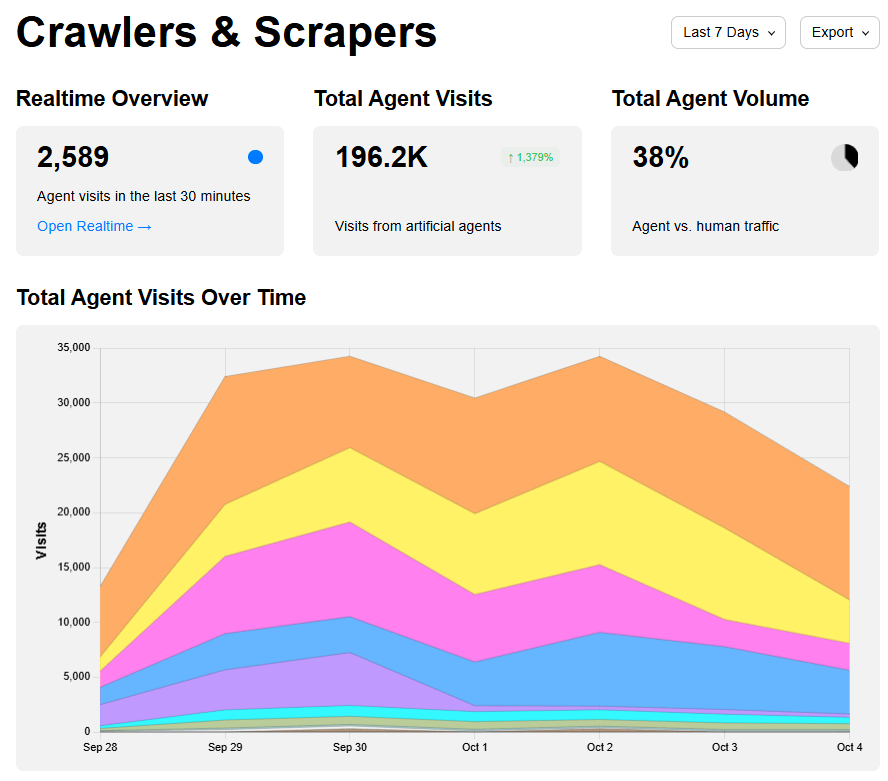
On sample traffic after content uploads, AI data scrapers often reached the site ahead of traditional SEO crawlers. Chart colours: AI Data Scrapers (orange), AI Search Crawlers (yellow), SEO Crawlers (pink), Search Engine Crawlers (blue).
Useful resources
- Known Agents
- user-agents.net
- Cloudflare AI bots
- Cloudflare AI bots blog
- Cloudflare WAF Rule V3
- AI robots / scrapers lists
- Content Signals
- Apache mod_setenvif
Catalogue observations are collated with thanks to sources such as Known Agents. This help text describes the current product behaviour and is not legal advice.